0day in {REA_TEAM}

P32Dasm v2.6 December 25, 2009

Filed under: P32Dasm, RE Tools — kienmanowar @ 1:49 am

Author : Darker

Hi folks, i prepare for you some Christmas gift – new release of P32Dasm :-) This release add some powerful features that allow you to analyze VB5/6 apps more detailed. More objects/classes are resolved, more procedures are identified with their real names, in some cases of .ocx, .dll files also added parameters with real names and types plus additional information as Enumerators, Constants, Events and Properties. So a lot of work was done here and i hope you enjoy this release. Your best tool for reversing VB5/6 apps is ready to use :-)

2.6 – [24.12.2009] – Christmas Release
+ Added procedure names identification
+ More objects recognition
+ Added reading more details (Enumerators, Constants, Events and Properties)
+ Added new Events icon for better resolution
+ Internal code tidy up and changes for displaying better debug info
+ More procedures details identified on some strange type apps (NCode)
- Removed displaying of procedure names list in output (moved to real names)
* fixed working of MRU files
* Fixed bug: missing end address in one procedure NCode object
* Fixed some GUI problems when app use visual styles

Download here:

http://progress-tools.110mb.com/p32dasm.zip


OllyDbg – EvO_DBG December 23, 2009

Filed under: OllyDbg - EvO_DBG, RE Tools — kienmanowar @ 7:05 am

Author: EvOlUtIoN

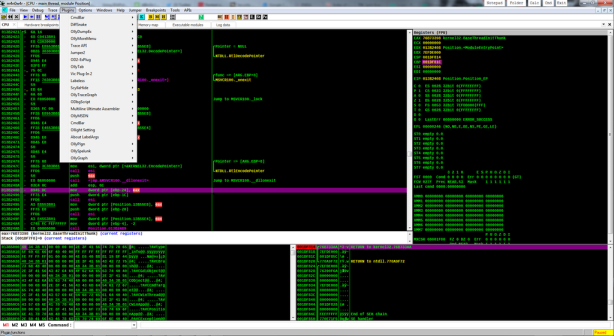
This is my version of OllyDBG.
I removed all useless plugins and put my preferred ones, and also i set-up a good configuration.
With it you should be able to load any protected file (themidaed for example).
Sometimes you have to change some options inside plugins (with obsidium for example), but the current setting is good in 90% of cases.
It has also a more advanced loaddll.exe that allows you to load dll’s in different memory locations, so you can rebuild relocations in an neasy way.

Download here:

http://www.mediafire.com/download.php?mjyuzbyjomx

Regards
m4n0w4r


MAPIMP Plugin version 0.6 December 22, 2009

Filed under: RE Tools — kienmanowar @ 7:14 am

MAPIMP Plugin version 0.6
by takerZ/tPORt
mod by BoRoV/TSRh
2009

• What is it?
This is an OllyDbg plugin which will help you to import map files exported by IDA, Dede, IDR, Microsoft and Borland linkers

• Why?
There are many plugins using which you can perform similar actions, but mapimp:
- Recognizes debugged file segments and applies names correctly
- Has an option to overwrite or skip names that intersect already defined
- Has a filter option which gives you great name demangling potential
- Works fast (but who cares nowadays, right?)

Version info:
+ added
* fixed
- removed

0.6: ( by BoRoV )
* fixed a bug with files who not have extension (thanks to sendersu for the report)
* fixed a bug in autoimport feature
* added feature, double click in list with masks to edit selected mask

0.5:
+ added name demangling feature
+ now it is possible to choose whether to apply names to debugged module or
currently viewed module
* map file parsing routine was a hack and so rewriten. Should now support IDA,
DeDe, IDR, Microsoft and Borland (thanks to void and awerto for CodeGear tests)
linkers map files and handle names longer than 235 characters (string buffer is
now 1kb long)
* recompiled with pcre 8.0. See changelog at http://www.pcre.org/changelog.txt
* fixed a bug when mapimp broke import procedure when trying to import a name to a
module with less number of segments than the name’s segment addressed
* fixed a bug when OllyDbg crashed while displaying format containing names in the
progress bar
* fixed a bug with an accelerators when it was unable to check\uncheck checkboxes
using a mouse click. The winner of “The stupidest bug of a year” award
* fixed a bug in autoimport feature which made it search for the map file every
int3 break event including step over (thanks to 9999 for the report)
* fixed “Options” window look with Windows themes (thanks to BoRoV for the report)
* config file moved to plugins folder

0.4:
* fixed map file parsing routine. Now you can load some
structure-incorrect map files like those which Interactive Delphi
Reconstructor exports
* fixed a bug with global shortcuts. ODBG_Pluginshortcut callback
works reeeally weird. Now press Ctrl + Shift + I to import
and Ctrl + Shift + M to open options window

0.3:
+ added keyboard shortcuts
* fixed memory leak in mask_filter function
* fixed mask manager’s focus and selection behaviour
* fixed a bug when being closed “Options” window did not return focus
to OllyDbg’s main window if it temporarily lost activity
* now autoimport does not search for the map file until debugee changes
* code refactored

0.2:
+ added autoimport feature (thanks to Jupiter for the idea)
+ added “Edit” button for mask manager
* more informative regular expression error messages
* fixed a bug when mapimp did not make the “Options” window modal while
inputing masks. So if you closed the options window with active input
box it caused a deadlock
* some interface changes

0.1:
+ first release

Download here
Change to mapimp06.7z!!

Best Regards
m4n0w4r


Ollydbg v2.0 March 28, 2009 March 30, 2009

Filed under: RE Tools — kienmanowar @ 8:50 am

The second beta. I’ve planned that it will come with the more or less complete help file. Unfortunately, I had no time to write it. Therefore there will be also the third beta release… soon.
There are many – over 20 – bugfixes in the beta 2, some of them are really critical. As promised, there are no significant changes, with two exceptions. The recognition of UNICODE strings is vastly improved, they are no longer limited to ASCII subset (option “Use IsTextUnicode()”. Also I recognize strings in the UTF-8 format. By the way, if you have some small sample program with the free source that uses UTF-8 strings, please send it to me (together with the screenshot of displayed strings) so that I will be able to test OllyDbg.
The second new feature is in the run trace. New option “Pause when EIP points to modified command” helps, for example, to find the real entry point of the SFX-ed code. Just don’t forget to create backup first (or use another new option, Auto backup user code)!

Download here:
http://ollydbg.de/odbg200j.zip

Regards


Diablo2oo2’s Universal Patcher V2.19 Final March 28, 2009

Filed under: RE Tools — kienmanowar @ 1:32 am

dup

Diablo2oo2’s Universal Patcher V2.19 Final

[Features]
-multiple file patcher
-create Offset and Search&Replace patch/loader
-compare files (RawOffset and VirtualAddress) with different filesize
-text patcher
-registry patcher, also for loaders
-attach files to patcher
-get filepaths from registry
-usage of CRC32 and filesize checks
-patching packed files
-compress patcher with your favorite packer
-saving projects
-use custom skin in your patcher
-add music (Tracker Modules: xm,mod,it,s3m,mtm,umx,v2m,ahx,sid) to patcher
-and many more…

[Version History]
[2.19]
-new “Text-Patch” module !
-bugfix in s&r compare module
-other bugfixes from v2.18
-added linkcursor in patcherwindow
-registry editor now can import v5 reg files
-faster scrolltext engine
-better scrolltext font management
-new function: import long hexpatterns in offset-patch-dialog
-fixed loader_installer bug
-added support for relative paths (subfolders) for the targetfiles
-search & replace comments bugfix
-loader: registrypatcher bugfix
-added new internal environment variable: %dup2_last_path%
-skincontrols now can have transparent backgroundcolor (FFFFFFFF)
-now you can execute multiple search&replace loaders from same directory

Download here:
http://free.pages.at/d2k2//downloads/dup2.rar


CodeWalker: Another AntiRootkit Tool March 11, 2009

Filed under: CodeWalker: Another AntiRootkit Tool, RE Tools — kienmanowar @ 2:05 am

CodeWalker: Another AntiRootkit Tool
Author : Thug4lif3 (aka Sơn “bird”, my brother :D )


He has developed an antirootkit tool called CodeWalker which can:

+ Detect hidden processes
+ Detect hidden drivers
+ Detect hidden files (support NTFS only)
+ Detect hooks in both kernel mode and usermode.
+ Works on Windows English 2000/XP/2003/Vista/2008.

The tool is currently in beta stage and im looking for people for testing it. I’ve already tested it with all rootkits samples I have and its detection rate seems optimistic. I think it’s very great if you guys test it against your rootkit zoo and provide the result you got with the tool. If there’s BSOD (of cos, you can never write a bug free proggie, rite? :P ), it would be very appreciated of you to upload minidumps to help me correct the tool. Thanks in advance.

I will update this tool frequently for new detection methods, bug fixs etc. Welcome for your all suggestions, bugs and minidumps

In this beta version, the main improves to other ark is heavily put in hidden driver object (System Modules tab) and code hooking detection.

For hidden driver detection, you can test it with some pretty well hidden driver PoC such as phide_ex and many builds of Rustock.B variants. Although you have to use the “Hardcore Scan” method to detect them.

For code hooking detection, the engine walks all the branches of scanned module i.e any execution path of it to detect modification (btw, that’s why i call it CodeWalker). IMHO, It can detect code hooking very well especially with rootkits that place abnormal hooks, although there’re false-positive detections.

Here’s the tool:

http://cmcinfosec.com/download/cmcark.zip
or
https://www.rootkit.com/vault/thug4lif3/cmcark_cw.0.2.2.9.12.rar

Thanx Thug4lif3 for sharing his Tool.


PatchDiff2 – A patch analysis plugin for IDA February 13, 2009

Filed under: OllyDbg Tutorials, PatchDiff2, RE Tools — kienmanowar @ 8:02 am

teen

PatchDiff2 – A patch analysis plugin for IDA

News :
02/12/2009: PatchDiff 2.0.6 released:

* Switchs to graph call for checksum instead of instruction frequency
* Removes invalid C++ classes/structs flagged as functions

08/19/2008: PatchDiff 2.0.5 released:

* Adds string references to the signature
* Fixes IPC close when option is disabled

07/22/2008:PatchDiff 2.0.4 released:

* Requires at least IDA 5.2
* Adds save backup results to IDB
* Adds Unmatch/Set match/Switch match submenus
* Adds “pipe” support to keep second IDA instance open
o menu Options/PatchDiff2 to disable/enable it per IDB
o registry HKLM\SOFTWARE\Tenable\PatchDiff2 IPC (DWORD) for the default setting
* Uses demangled function names
* Ignores duplicated names

07/07/2008:PatchDiff 2.0.3 released:

* Adds support for C++ classes in the signature engine (improves results against c++ targets)
* No longer relies on IDA code refs (due to bad references)
* x86: merges inc reg and dec reg to one instruction
* x86: handles jmp $2/$5
* x86: stops block tracing on int3
* Bugfix: Does not try to display graphs that IDA can’t handle

07/02/2008:PatchDiff 2.0.2 released – now supports IDA 5.1 and 5.2
06/27/2008:PatchDiff 2.0.1 released

Description
PatchDiff2 is a plugin for the Windows version of the IDA dissassembler that can analyze two IDB files and find the differences between both. PatchDiff2 is free and fully integrates with the latest version of IDA (5.2).
The plugin can perform the following tasks :

* Display the list of identical functions
* Display the list of matched functions
* Display the list of unmatched functions (with the CRC)
* Display a flow graph for identical and matched functions

The main purpose of this plugin is to be fast and give accurate results when working on a security patch or a hotfix. Therefore this tool is not made to find similar functions between two different programs.
Patchdiff2 supports all processors that IDA can handle and is available in two versions: 32 bit and a 64 bit.

patchdiff2 is freely distributed to the community by Tenable Network Security in the hope it will be useful to you and help research engineers to better analyze different patches. However, Tenable does not provide support for this tool and offers no garantee regarding its use or output. Please read the end-user license agreement before using this program.

Demo
patch

View here :

http://cgi.tenablesecurity.com/tenable/pdiff2.swf.html

How to use it
PatchDiff2 can be launched through the plugins menu or by the keyboard shortcut ‘CTRL+8′. When the analysis is done, Identical, unmatched and matched functions are displayed in separate lists.
Flow graphs of matched and identical functions can be displayed by doing a rigth click on the given functions and by clicking on ‘Display graphs’.
Graph nodes can be synchronized by double clicking on a given node. Graphs use the following colors:

* white: identical nodes
* grey: unmatched nodes
* red: matched nodes
* tan: identical nodes (different crc)

Installation
Copy the files “patchdiff2.plw” and “patchdiff2.p64″ into the IDA plugins directory (usually C:\Program Files\IDA\plugins) and restart IDA.

Download
You can download PatchDiff2 2.0.6 : http://cgi.tenablesecurity.com/tenable/dl.php?p=patchdiff2-2.0.6.zip


Universal Import Fixer (UIF) v1.2 (FINAL) February 6, 2009

Filed under: RE Tools, Universal Import Fixer (UIF) v1.2 (FINAL) — kienmanowar @ 7:26 am

Universal Import Fixer (UIF) v1.2 (FINAL)

Use this tool for fixing Import Elimination, Directly Imports and Shuffled, Disordered, Scattered Imports.

So you can use this tool for changing IAT Base Address and Sorting IATs in New (other) Address.

Tested on:

Armadillo
ASProtect
Enigma
ExeCryptor
eXPressor
PeSpin
RlPack
VMProtect
TheMida
WinLicense

and any protector with Import Elimination, Directly Imports and Shuffled, Disordered, Scattered Imports.

Notes:
======
This tool is an Import Fixer (not Import Rebuilder ImpRec etc) and Just work in memory of target process (Just for 32 bit processes).
Always first use UIF then Dump target process.

UIF can fix actual APIs, dont use it for fixing Emulated/Redirected APIs to protector’s stub.you must use UIF After fixing Magic IAT jump (or use any methods) to convert Emulated/Redirected APIs to Actual APIs.

Samples:

Armadillo : Import Elimination
ASProtect : Directly Imports
Enigma : Shuffled, Disordered, Scattered Imports
ExeCryptor : Scattered Imports in Protector Stub
eXPressor : Directly Imports
PeSpin : Directly, Shuffled, Disordered, Scattered Imports
RlPack : Shuffled, Disordered, Scattered Imports
VMProtect : Directly Imports
TheMida : Directly Imports
WinLicense : Directly Imports

for Fast Speed:
===============
-After Click on you can Minimize UIF to the taskbar.
-Just enter Code section start and end (.text section etc).
-Dont check “Fix Directly Imports” if you dont need to it.

History:
========

Update (2008.12.31):
====================
+Code improved for better processing invalid ImageBase,ImageSize and invalid PE.
+Some small changes for more Compatibility/Stability.
-PSAPI library removed from UIF engine (shit library with many bugs).

v1.2 FINAL update (2008.06.15):
===============================
+Code Optimized again for better result.
+UIF.dll released (for using UIF in other applications).
Coded with pure Api,very fast and small size.

v1.2 FINAL update (2008.04.24):
===============================
+Fast Speed option added.

v1.2 FINAL (2008.04.19):
========================
+Now UIF can process Ring0 Hooked APIs (KAV,ZoneAlarm,… etc).
-Minor Bugs fixed.

v1.2 Stable (2008.04.04):
=========================
+Algorithm improved for Fast Speed.
-Option ‘Main exe Exports’ removed (now UIF can detect it automatically)
-Option ‘Fix NtDll to Kernel32′ removed (now UIF can detect it automatically)
-Minor Bugs fixed.

v1.0 Final+ (2008.03.21):
=========================
+Code Optimized for Fast Speed.
+Always OnTop Added.
+Tested again on many targets:
(TheMida,WinLicense,Armadillo,ASProtect,Enigma,eXPressor,PeSpin,…)
-Bug fixed in Fixing Directly Imports in Delphi,BCB,VC(MFC) Applications.

v1.0 Final update (2008.02.23):
===============================
+Algorithm improved for better fixing Directly imports.
+Show modules count and progress in StatusBar.
-GUI bug fixed on large fonts >=120 dpi.

v1.0 Final update (2008.01.15):
===============================
-Some small bugs fixed.
+Algorithm improved for very big IAT size.
+Auto fill improved for detecting dlls correctly.

v1.0 Public (2008.01.12):
=========================
First public release…

v1.0 Private (2005.02.23):
==========================
For personal use…

download (~190 kb) :

http://magic.shabgard.org/UIF.zip


ResEdit 1.4.4.16 February 3, 2009

Filed under: RE Tools, ResEdit 1.4.4.16 — kienmanowar @ 1:53 am
Tags:

ResEdit 1.4.4.16

ResEdit is a free Resource Editor for Win32 programs. You can use it if you want to use dialogs, icon, version information or other types of resources. Output files can be compiled by any Win32 compiler, like MinGW and Microsoft Visual C++. To open a file which uses Win32 API symbolic constants, you will also need Win32 header files (usually coming with you compiler).

If you don’t have any C++ compiler, you will need the Win32 headers (mainly windows.h and commctrl.h). You can download the Windows® Server 2003 SP1 Platform SDK to get these files.

Features:

- Importing most of the rc files generated by Microsoft Visual Studio resource editor. Some informations like macro definitions may then be lost while saving the project with ResEdit
- Advanced Dialog editor. All existing kind of Win32 controls are supported (Static text, Buttons, Edit controls, Pictures, …).
- A basic picture editor to open and modify bitmaps, icons and cursors
- Possibility to include all sort of resources.
- Generation of C++ code for the Dialogs (code with CreateWindowEx) and Menus (CreateMenu, CreatePopupMenu…). However it is not possible to import C++ sources files.
- Unlimited Undo/Redo buffers
- Customizable layout : you can drag and drop panels to place it wherever you want.

Download

The current version of ResEdit is 1.4.4.16.

* ANSI build (413 Ko) [Download] : http://www.resedit.net/ResEdit-ANSI.7z
* Unicode Build (418 Ko) [Download] : http://www.resedit.net/ResEdit-UNICODE.7z

ResEdit does not have any setup program, you just have to extract the files contained in the archive in the directory of your choice.


FileAlyzer 1.6.0.4 February 3, 2009

Filed under: FileAlyzer 1.6.0.4, RE Tools — kienmanowar @ 1:49 am

FileAlyzer 1.6.0.4

FileAlyzer is a tool to analyze files – the name itself was initially just a typo of FileAnalyzer, but after a few days I decided to keep it. FileAlyzer allows a basic analysis of files (showing file properties and file contents in hex dump form) and is able to interpret common file contents like resources structures (like text, graphics, HTML, media and PE).

Using FileAlyzer is as simple as viewing the regular properties of a file – just right-click the file you want to analyze and choose Open in FileAlyzer.

Updates

* 1.6.0.4 (August 6th, 2008) Restored support for files > 4 GB (displayed file size; hex viewers are disabled for now), Added UPX header information tab
* 1.5.5 (June 8th, 2007) New hex view, improved Authenticode display, support for more archive types (rar, nsis, etc.), Works with Windows Vista.
* 1.4 (December 13th, 2005) New version with included ACL editing and plaintext display, search results cleanup with Del key.
* 1.2 rel 3 (July 8th, 2005) Maintenance release including more translations.
* 1.2 rel 2 (June 2005) Maintenance release including more translations.
* 1.2 (March 4th, 2005) CHM contents listing, PE signature scanning, multiple small fixes.
* 1.1i ADS support, display of file security settings.
* 1.1h (September 25th, 2003) improved resourses display, ID3v2 support, cab support, load speedup.
* 1.1g (September 8th, 2003) small fixes, file extensions specified in external file.
* 1.1f (August 12th, 2003) added window size/position saved, DFM decompression, UPX decompression, ELF (linux binary) analysis, export of resources, syntax highlighting for text preview.
* 1.1e (July 29th, 2003) added colored hex dump, hex dump display of resources, multi-lingual version info display, section panel bar.
* 1.1d (July 5th, 2003) added display of import/export tables and creation of text format reports.
* 1.1c improves translation and adds dynamix hex dump width as well as string recognition.
* 1.1b added Setup menu and new languages
* 1.1 added text table (CSV) and database (dBase) format.

file1

Download here :

http://www.safer-networking.org/files/filealyz.exe

Regards
m4n0w4r